

Any time a video game gets remade, there’s a good chance that the developers are setting out to update the way that it looks and feels, but there’s also an opportunity for them to introduce more options for the player to explore that will allow them to customize their experience. That’s exactly what’s happening in The Legend of Zelda: Ocarina of Time remake, as a recent hands-on video by Zeltik shows.
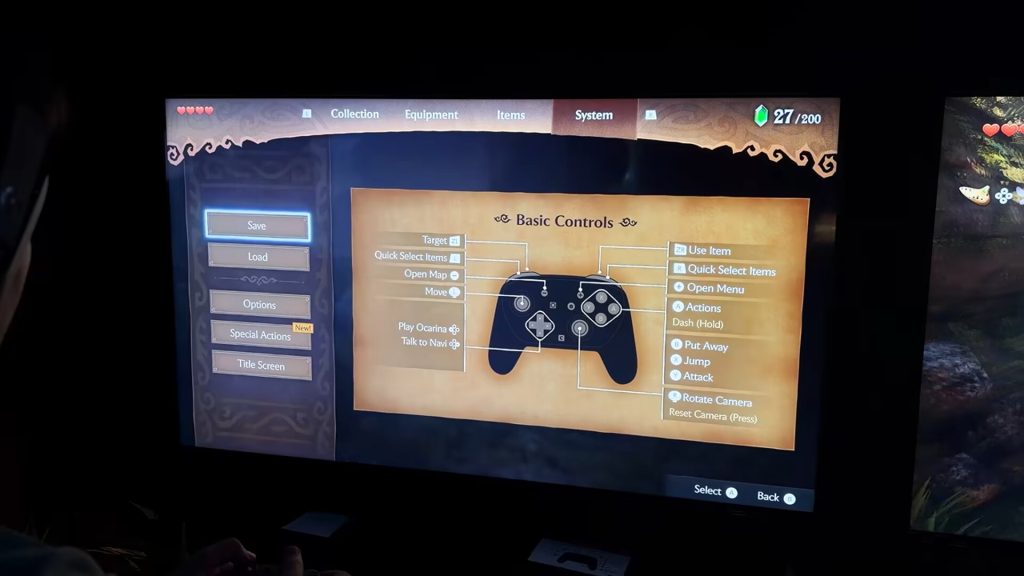
The various options and settings in The Legend of Zelda: Ocarina of Time for Nintendo Switch 2 have been greatly expanded from the N64 and even the 3DS versions. Zeltik spends a good chunk of his video going through the options menu, but first he provides a quick look at the controls screen, showing us what each button will do in this new version of Ocarina of Time. OoT’s iconic Z-targeting is assigned to the ZL trigger, while you can scroll through the Quick Select item bar by using L and R. I haven’t been a huge fan of the heavy use of the item bar in The Legend of Zelda in recent titles because it can feel cumbersome to have to scroll through your entire inventory one by one to find what you’re looking for, but Zeltik makes sure to note that it feels much less clunky thanks to Ocarina of Time’s smaller item pool. To use the currently selected/equipped item, you’ll press the ZR trigger.
Screenshot: YouTube – Zeltik “I Played Ocarina of Time Remake (Hands-On Preview)”
The controls screen also features a “Special Actions” page that details various button combinations that can be used in game to perform actions that can’t be accomplished with one button alone. From the video, it looks like each of these is going to be combat-related – things like Roll Attack, Backflip, and Jump Attack are listed here.
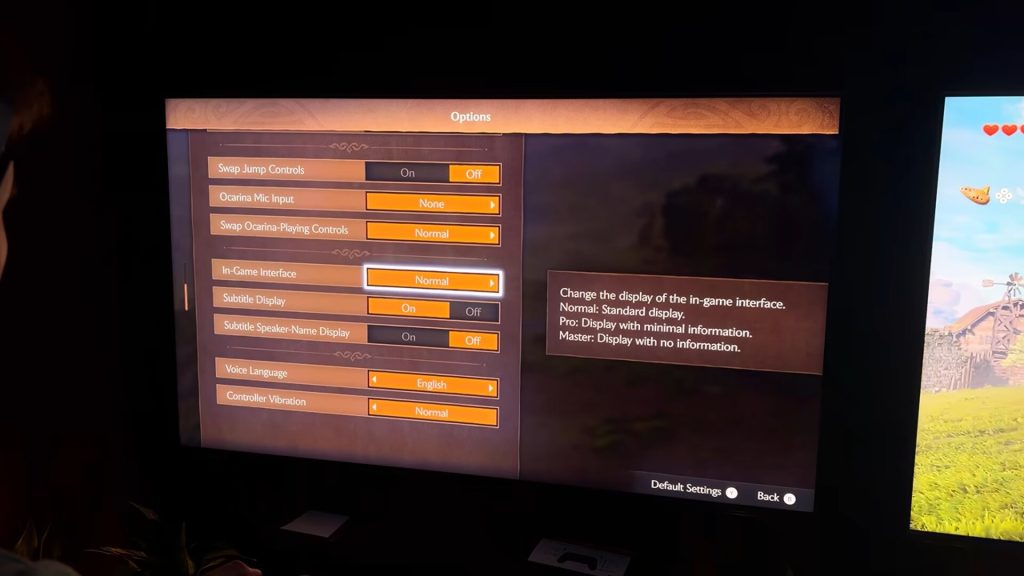
The options menu is where all of the customizations players can make are listed. There are settings that are commonplace in modern games, like the option to invert both the horizontal and vertical cameras, as well as adjust the camera rotation speed. Players can also turn motion control aiming on or off and set their ZL-targeting to hold or toggle, letting them hold ZL to target or tap it once to target and then tap it again to release the targeting. The jump and attack buttons can also be swapped if you end up finding pressing X to jump to be too much of a hassle.
Also present is a mic input option for the Ocarina, a nifty feature that was detailed during The Legend of Zelda Direct. Turning on the mic input allows for humming or whistling the various ocarina songs instead of playing them with buttons on the controller, or, for those who want to get fancy with it, you can play a real Ocarina (or presumably any instrument) into the mic and have the game recognize it. HORI is also producing an electric Ocarina of Time that can be used with the game, though it’s currently sold out on Nintendo’s online store. Things can be done the old-fashioned way too – there are, of course, options to use button presses to play Link’s ocarina. In the options menu you can change which buttons play notes on the ocarina. There’s a two-handed mode, like in Ocarina of Time 3D, or a one-handed mode, like the original N64 version.
There are three heads-up-display options as well. The normal option will show you plenty of information, including control reminders, which item you currently have selected, and how many Hearts Link has left. The Pro HUD option is a “Display with minimal information” and will remove every HUD element, including Link’s Hearts, though in Zeltik’s video I did notice a quest flag pop up while he had the Pro option turned on. The final option, Master, is a “display with no information,” seemingly removing every visual cue that isn’t in-world, including the ZL-targeting lock-on visual. It looks like a very immersive option that I’m sure some players will go nuts for, allowing them to fully take in the beauty of this reimagined Hyrule without distraction.
Screenshot: YouTube – Zeltik “I Played Ocarina of Time Remake (Hands-On Preview)”
Other display options include the ability to not only turn subtitles on and off but also to have them indicate which character is speaking by attaching their name to the subtitles. Rounding out the extensive options menu is Voice Language selection and a setting for changing the controller vibrations.
It’s great to see that the team behind the Switch 2 version of Ocarina of Time has even put a lot of thought and work into how players are going to be able to interact with this game beyond updating the visuals and reimagining things like puzzles and dialogue, and it makes me all the more excited to check it out once it releases in a few short weeks on November 5th, 2026.
Check out more Zelda content
Nintendo underestimated demand for Zelda 40th Anniversary Switch 2 console
Catch a brief glimpse of Dark Link in short Zelda: Ocarina of Time remake teaser
Leave a Comment

Written by Jaxson Tapp
As a lover of gaming and the written word, Jaxson currently fills his time not only with playing games, but also writing about them. Ready for anything, Jaxson’s passion for puzzle games, JRPGs, tough platformers, and whimsical indies helps him bring a well-rounded opinion to Nintendo Wire’s reporting.
