So, you’re about to take the plunge into the world on Nintendo Switch 2? Well, lucky for you, Nintendo has made it pretty easy to get started, but there are a few things you should know, especially if you are planning on upgrading from the original Nintendo Switch. Here’s everything you should know before you make your purchase.
Buying a Nintendo Switch 2 Console

Picking up a Nintendo Switch 2 console is pretty straightforward, but you might have a few questions before grabbing one for yourself or a loved one. If you already own an original Nintendo Switch, the good news is that nearly every Switch title is backward compatible with the Switch 2 — and some even offer free upgrades to take advantage of the new hardware. Most controllers and accessories work as well, but keep in mind that original Joy-Con controllers cannot physically connect to the Switch 2 tablet, as the new system uses completely different rails and connectors.
Here are the options available right now:
-
Switch 2 Mario Kart World Bundle — $499 – Buy at Amazon
Save $30 compared to buying the game and console separately. This bundle will be discontinued once stock runs out.
Backwards Combability
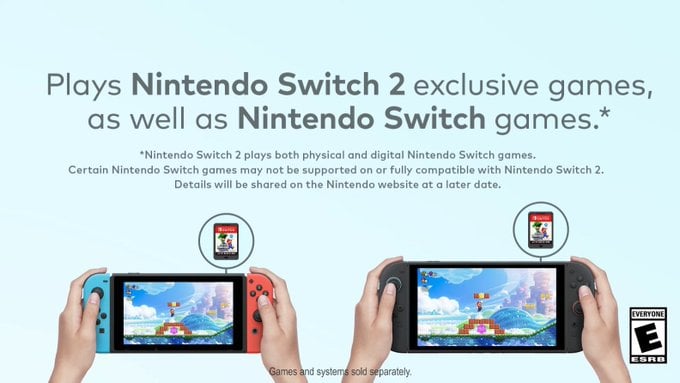
If you already own a Nintendo Switch, you’ll be happy to know that nearly all of your existing games and accessories are compatible with the Nintendo Switch 2. That said, there are a few notable exceptions worth knowing about—so let’s dive in.
From a games perspective, almost all original Nintendo Switch software runs on Switch 2. However, the new Joy-Con 2 controllers included with the system are not compatible with a small handful of motion-focused titles. In these cases, the games themselves still work perfectly, but you’ll need to pair an original Nintendo Switch Joy-Con to play.
The affected titles include:
-
Ring Fit Adventure
-
1-2-Switch
-
Everybody 1-2-Switch
-
Game Builder Garage
-
WarioWare: Move It!
-
Nintendo Switch Sports
Again, these games are fully playable on Switch 2—you’ll just need to connect an original Joy-Con controller first.
If you still have Nintendo Labo kits, compatibility is more limited. Some features work while others do not, so it’s best to check Nintendo’s official compatibility page if you plan on using any Labo creations.
For everything else, Nintendo provides a backward compatibility checker that lets you look up individual Switch titles to see if any issues have been reported. Nintendo has been actively patching problem games since launch, so chances are your entire library will be ready to go without issue.
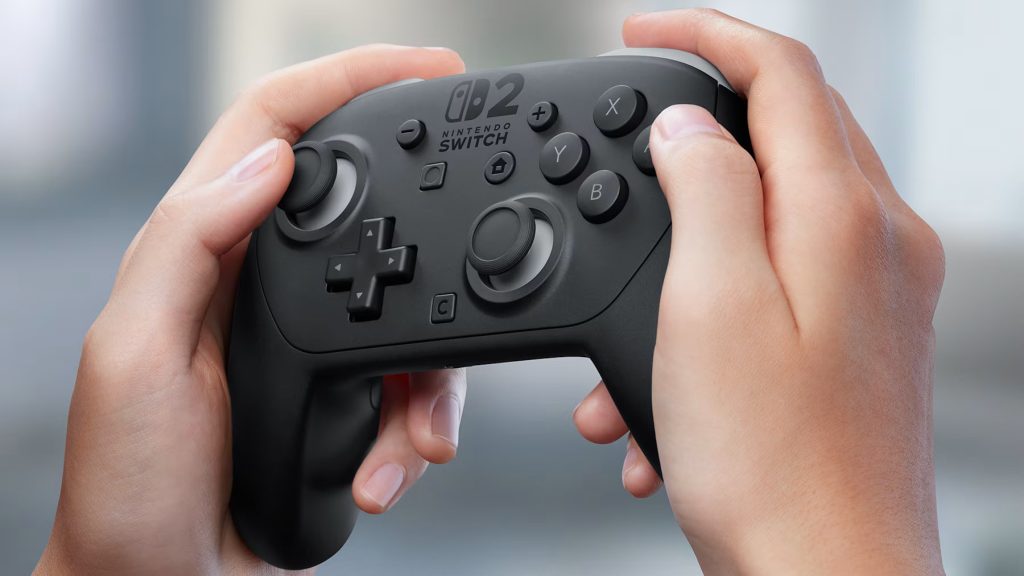
When it comes to accessories, the original Nintendo Switch Pro Controller, most third-party controllers, amiibo, and original Joy-Con controllers are all compatible with the Switch 2. However, you won’t be able to charge original Joy-Con using the Switch 2 console, so you’ll need to either charge them on your original Switch or pick up a dedicated Joy-Con charging accessory.
The Switch 2 also introduces a new Pro Controller, which features two programmable back buttons and a dedicated C button for Game Chat. We’ll take a closer look at that controller below.
How the Switch 2 Improves Visual Performance
Unlike the original Switch, which capped out at 1080p, the Switch 2 can output:
-
4K at 60hz (60 frames per second)
-
1440p at 120hz (120 frames per second)
-
HDR support for dramatically improved contrast and color
HDR—or high dynamic range—allows a TV to display much brighter highlights and much deeper dark areas at the same time. When done well, HDR makes an image far more vivid, realistic, and eye catching than a standard non-HDR picture.
If all of this sounds a bit overwhelming, the short version is this: the Nintendo Switch 2 is a significant step up from the original Switch. And don’t worry! If you don’t have a 4K TV, the Switch 2 will automatically scale to lower resolutions and frame rates, so you’ll still get a great experience on any modern display.
MicroSD Express Cards

You might not think you’ll need one right away, but the Nintendo Switch 2’s 256GB of onboard storage fills up fast. With some games pushing 90GB each, you’ll definitely want to invest in additional storage sooner rather than later. Unlike the original Switch, the Switch 2 uses a much faster (and slightly more expensive) MicroSD Express card. It’s extremely important that you only purchase cards labeled MicroSD Express — standard MicroSD cards will not work on the Switch 2.
Luckily, several Express cards are still discounted at Amazon:
- Samsung P9 256GB MicroSD Express – $32.99 (Best Deal)
-
Lexar 1TB MicroSD Express for Nintendo Switch 2 — $185.99 ($34 off)
System Transfer
Now that you’ve snagged your brand-new console, how do you get it set up? If this is your first Nintendo Switch, the process is simple: just power it on, connect to your Wi-Fi, and follow any system update prompts the Switch 2 gives you.
If you’re transferring data from an original Nintendo Switch to a Switch 2, the process is a bit more involved. Fortunately, Nintendo has put together an easy-to-follow video that walks through every step. You can watch it above!
Switch 2 Game Chat
For those of you out of the loop, one of the biggest upgrades to the Nintendo Switch 2 is the addition of Game Chat, a high quality way to voice chat, share screens, and even video chat with friends. The system includes a built in microphone for standard audio chat, but if you want to jump into video calls, you’ll need to pick up a compatible USB camera and be enrolled in Nintendo Switch Online starting on March 31st 2026. (The service is free until then.) If you have questions about how this feature works, I highly recommend checking out our dedicated article on Game Chat right here.
Switch 2 Games

The Holidays may be over, but several Nintendo Switch 2 games are still discounted on Amazon, with some titles dropping as low as $30. You can check out the full list of discounted games here.
Here are a few standout deals we spotted:
- Star Wars Outlaws – $39.97 – $30 off
- Chronos $43.70 (27% off)
- NickToons & The Dice of Destiny – $29.99 (40% off)
- Persona 3 Reload: Launch Edition – $41.99 (30% off)
- Yakuza 0 – $29.99 (40% off)
But if you’re just looking for a list of the most popular Switch 2 games to put under the tree this year, here are the top-selling titles of 2025 so far from Amazon.
- Donkey Kong Bananza
- Metroid Prime 4 Beyond
- Kirby Air Riders
- Star Wars Outlaws
- Hyrule Warriors: Age of Imprisonment
- Supe Mario Party Jamboree
- Kirby and the Forgotten Land
- Cyberpunk 2077
As mentioned above, original Switch titles are compatible with the Switch 2, so if you’re looking to pick up older games that still shine with updated graphics and resolution, you can find a full list of titles with free upgrades here.

Written by Jason Ganos
Nintendo super fan since birth, Jason is the creator of Amiibo News and editor-in-chief at Nintendo Wire. One of his life goals is to provide the latest Nintendo news to fellow gamers with his natural know-how.
