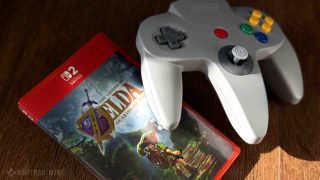


With The Legend of Zelda: Ocarina of Time being brought into the modern era with its Switch 2 remake, the game has been updated with modern controls. Gone are the days of having items assigned to three of the N64 controller’s C Buttons and having to adjust the camera by manually tapping Z. Instead, items are selectable one at a time with L and R, to be used with ZR, and you can freely control the camera with the right stick. The main ways of controlling The Legend of Zelda: Ocarina of Time on Switch 2 are going to be the Switch 2’s Joy-Con 2 or the Switch 2 Pro controller — but what if players want to dive even deeper into nostalgia? The Nintendo Switch Online Nintendo 64 controller is compatible with the Switch 2, after all.
Does the Nintendo Switch Online Nintendo 64 controller work with Zelda: Ocarina of Time?
I’ll start by saying that the N64 controller does technically work with the Switch 2 version of Ocarina of Time. However, players wanting to relive the glory days with this three-pronged pad in hand are not likely to have a good time using it.
The first indication that all may not be well when using the N64 controller is that the in-game diagram showing the game’s controls doesn’t switch over to an image of an N64 controller, instead showing a Nintendo Switch 2 Pro Controller, detailing what each of the buttons on the Pro Controller does. Scanning this screen and comparing it to the physical buttons on the N64 Controller, you’re going to notice some issues.
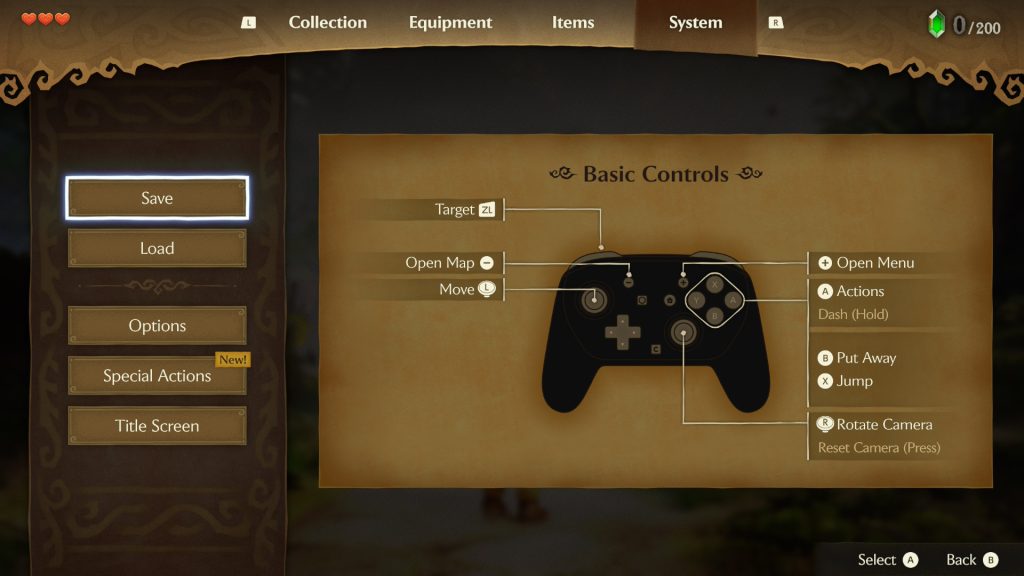
First, jump is assigned to the X button, while the N64 controller doesn’t have it. This means that you won’t be able to jump with the default control scheme while using the N64 controller. There were early reports of the N64 controller activating a hidden “auto-jump” like in the original N64 game, but this is untrue. The only way you can use Ocarina of Time’s new, on-demand jump is by going into the Options menu and turning on “Swap Jump Controls.” What this does is swaps jump to the B button and moves any action normally assigned to the B button, such as putting away items, to the X button. This solves the jumping problem, but now you have no way to put away your items.
You’ll also note that there’s no Y button on the N64 controller, which means you don’t have a dedicated button for pulling out your sword to attack when using the N64 controller. You can get around this by Z-Targeting an enemy, pushing the control stick towards them, and pushing A to initiate a jump attack, thereby pulling out your sword, but that is the only way to unsheathe it while using the N64 controller.
Our final missing button is the minus button, used for pulling out your map. This means that using the N64 controller leaves you with no way to use the map. Since the map isn’t present on the pause screen, there are no real workarounds for this one.
Now for the things that are still possible, but clunky. The N64 controller doesn’t have a second analogue stick, leaving your camera controls to be handled by the C buttons. Each C button moves the camera in the direction indicated by the button, provided you don’t have them inverted in the Options menu. Our second cumbersome situation is using items with ZR. By default, the N64 controller’s Z button acts as ZL, allowing you to use it for Z-Targeting, just like in the original game. However, the classic N64 controller didn’t have a ZR button equivalent, leaving its Switch-compatible wireless descendent to include a tiny ZR button on the very top of the controller. This leaves you needing to reach to the very top of your controller to press a very small button in order to use items like the Fairy Slingshot. It’s not exactly comfortable.
Can the Nintendo Switch Online Nintendo 64 controller’s buttons be remapped for Ocarina of Time?
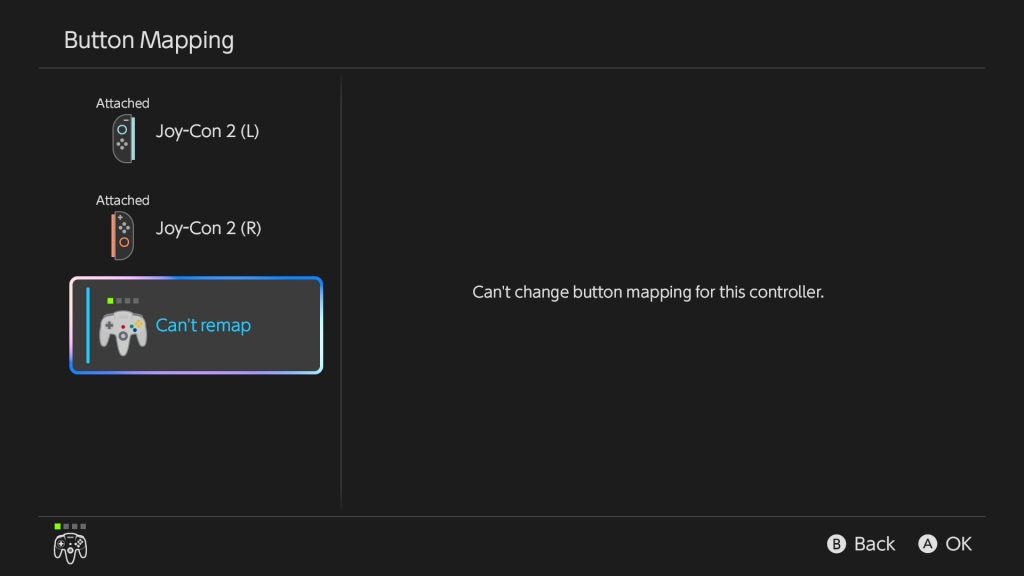
Folks who are aware of all of the ins and outs of the Nintendo Switch 2’s firmware capabilities may remember that the Switch 2 has a dedicated setting for remapping controller buttons available in the Accessibility menu of the Switch 2 settings. Unfortunately, making your way to that menu with an N64 controller connected to your Switch 2 will show you that the N64 controller cannot be remapped using this setting.
So, can you use the N64 controller with Ocarina of Time?
Ultimately, while you can use the N64 controller to play The Legend of Zelda: Ocarina of Time on the Switch 2, you won’t have enough options for a smooth or even enjoyable experience. Dedicated players may decide that the nostalgia is worth persevering for, but they’ll have to put up with a combination of workarounds, swapping settings back and forth, and missing out on features to make it work. At the end of the day, I wouldn’t call it unplayable but it sure isn’t worth the effort.
Check out more Ocarina of Time guides
Leave a Comment

Written by Jaxson Tapp
As a lover of gaming and the written word, Jaxson currently fills his time not only with playing games, but also writing about them. Ready for anything, Jaxson’s passion for puzzle games, JRPGs, tough platformers, and whimsical indies helps him bring a well-rounded opinion to Nintendo Wire’s reporting.
